A support assistant asks Alice how much detail she wants in every new conversation. Saving “brief replies” sounds like an easy fix, until Alice changes her preference or a request accidentally loads another user’s setting.
This guide is for developers who know basic Python and want to add useful memory to an agent without losing control of what it stores. You will build a local SQLite preference store and test saving, retrieval, updates, expiry and deletion. Alice and the support system are illustrative; the example uses no real customer data or model calls.
Quick answer
AI agent memory is information an application retains and retrieves for later work. The application decides what to save, checks who may use it and selects relevant information for the next model call. Saved task progress and cross-session preferences serve different purposes, and neither guarantees that a model will use the information correctly.
What is AI agent memory?
Think of memory as a notebook the application manages: keeping a note helps only if the right information is available for the next task. Three kinds of information serve different purposes:
- Model context: instructions, messages and tool results supplied for one call. The context window limits how much input and output the model can work with.
- Durable application state: progress that must survive a restart, such as a ticket reference and completed lookup IDs. Not every field belongs in a prompt.
- Long-term notes: information useful across conversations, such as Alice’s confirmed reply preference.
LangGraph’s memory overview similarly distinguishes thread-scoped state from cross-session notes. It groups notes into namespaces, such as an organization and user. This example uses ordinary Python and SQLite, not LangGraph APIs.
For the surrounding decision loop, see What Is an AI Agent?.
Why does memory matter?
Saved preferences spare Alice from repeating her choices. Durable state lets a support job resume after a restart. Both help only when the retained information is useful: an old preference may conflict with today’s request, and unrelated conversation history can crowd out relevant details. Give each retained field a purpose before saving it.
How does agent memory work?
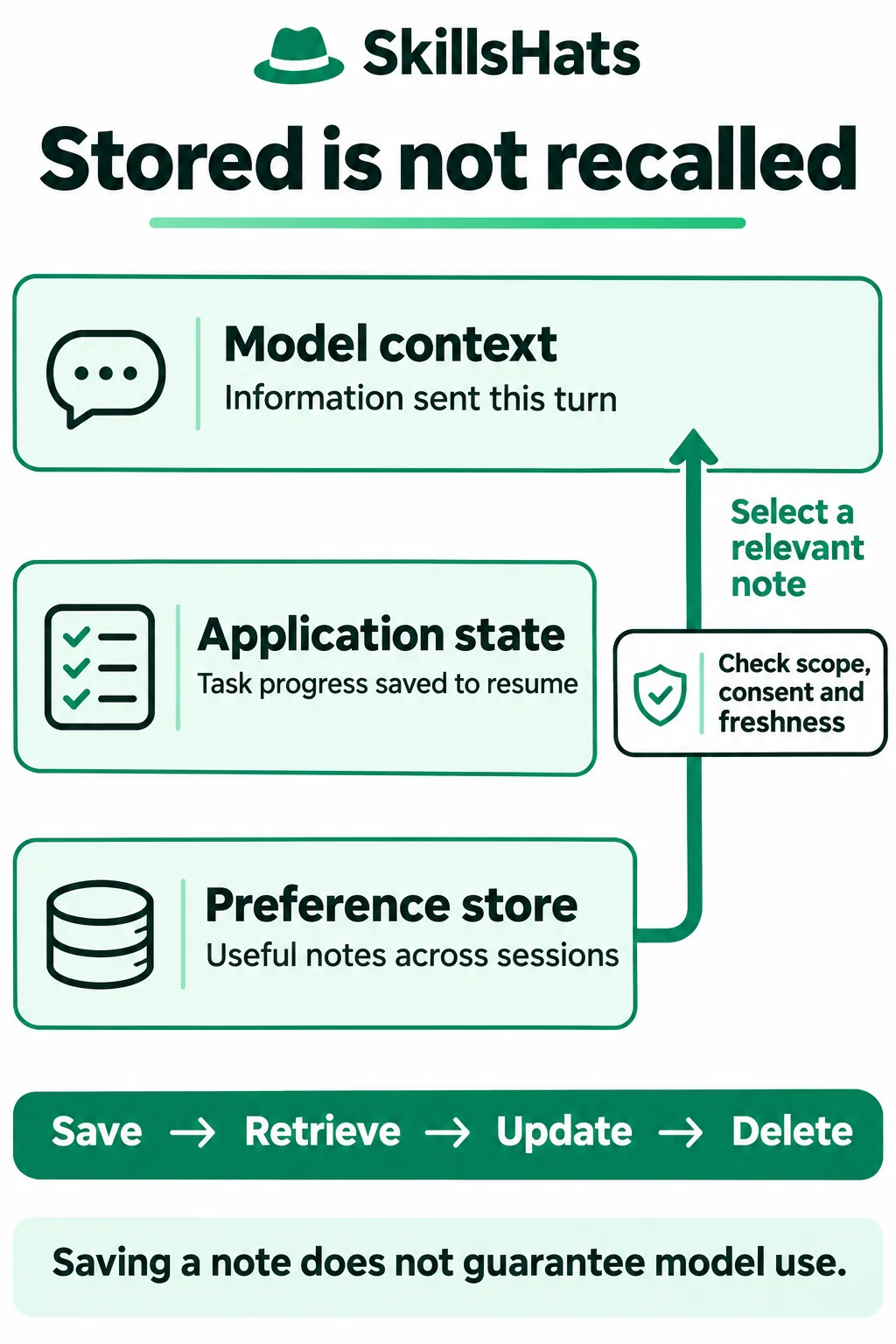
The diagram shows purposes, not three mandatory databases. Its arrow represents an explicit retrieval decision between storage and model context.
Components and responsibilities
The host application owns the user’s identity, permissions and consent checks. The preference store keeps a value together with its origin, update time, expiry and revision. A revision is a token identifying the version that a caller read. The context-building step selects a usable preference for a particular request. The model receives that selected context; it does not gain unrestricted access to the store.
Follow one preference from save to use
- Alice chooses “Remember that I prefer brief support replies.” The application checks consent and saves
brieffor her account. - A later reply task retrieves her current, permitted preference.
- The application checks relevance. A request for detail now can override the general preference without rewriting it.
- The selected preference enters model context, and the resulting answer is checked.
- Alice can change or forget the setting through the application.
The Python example implements storage. Context selection and model evaluation are separate steps, illustrated rather than executed here.
Supply the selected note as context
After an authorized lookup, the host might prepare this context fragment:
{
  "current_request": "Explain why the export timed out.",
  "saved_preference": {
    "reply_style": "brief",
    "source": "user-confirmed"
  }
}
This is illustrative JSON, not a provider’s API format or an executed model request. The host must place the selected information into the provider’s messages. A missing, expired or denied preference should be left out, not interpreted as “the user prefers brief replies.”
Practical example: a scoped preference store
Use Python 3.8.20 with its standard-library sqlite3 module; this example was executed with SQLite 3.46.0. There are no additional packages or changes to the site’s Python/Django stack. Save the two files below together in an empty tutorial directory.
Save preference_store.py:
import re
import sqlite3
import time
from uuid import uuid4


class Conflict(Exception):
    pass


def connect(path):
    db = sqlite3.connect(path)
    db.row_factory = sqlite3.Row
    db.execute("""CREATE TABLE IF NOT EXISTS preferences (
        tenant TEXT NOT NULL, user_id TEXT NOT NULL,
        style TEXT NOT NULL CHECK(style IN ('brief', 'detailed')),
        revision TEXT NOT NULL, source TEXT NOT NULL,
        updated_at INTEGER NOT NULL, expires_at INTEGER NOT NULL,
        PRIMARY KEY (tenant, user_id)
    )""")
    return db


class PreferenceStore:
    def __init__(self, db, tenant, user_id, consent_check=lambda: False, clock=time.time):
        for value in (tenant, user_id):
            if not isinstance(value, str) or not re.fullmatch(r"[a-z0-9-]{1,40}", value):
                raise ValueError("invalid_scope")
        if not callable(consent_check):
            raise ValueError("invalid_consent_check")
        self.db, self.scope = db, (tenant, user_id)
        self.consent_check, self.clock = consent_check, clock

    def require_consent(self):
        if self.consent_check() is not True:
            raise PermissionError("consent_required")

    def retrieve(self):
        self.require_consent()
        row = self.db.execute(
            "SELECT style, revision, source, updated_at, expires_at "
            "FROM preferences WHERE tenant=? AND user_id=? AND expires_at>?",
            self.scope + (int(self.clock()),),
        ).fetchone()
        return dict(row) if row is not None else None

    def save(self, style, expected_revision=None, ttl=60):
        self.require_consent()
        if not isinstance(style, str) or style not in ("brief", "detailed"):
            raise ValueError("invalid_style")
        if type(ttl) is not int or not 1 <= ttl <= 86400:
            raise ValueError("invalid_ttl")
        if expected_revision is not None and (
            not isinstance(expected_revision, str)
            or not re.fullmatch(r"[0-9a-f]{32}", expected_revision)
        ):
            raise ValueError("invalid_revision")
        now, revision = int(self.clock()), uuid4().hex
        with self.db:
            if expected_revision is None:
                try:
                    self.db.execute(
                        "INSERT INTO preferences VALUES (?, ?, ?, ?, ?, ?, ?)",
                        self.scope + (style, revision, "user-confirmed", now, now + ttl),
                    )
                except sqlite3.IntegrityError:
                    raise Conflict("already_exists") from None
            else:
                changed = self.db.execute(
                    "UPDATE preferences SET style=?, revision=?, source=?, "
                    "updated_at=?, expires_at=? WHERE tenant=? AND user_id=? "
                    "AND revision=? AND expires_at>?",
                    (style, revision, "user-confirmed", now, now + ttl)
                    + self.scope + (expected_revision, now),
                ).rowcount
                if changed != 1:
                    raise Conflict("stale_or_missing")
        return revision

    def delete(self):
        # Forgetting remains available after consent is withdrawn.
        with self.db:
            return self.db.execute(
                "DELETE FROM preferences WHERE tenant=? AND user_id=?", self.scope,
            ).rowcount

    def purge_expired(self):
        with self.db:
            return self.db.execute(
                "DELETE FROM preferences WHERE tenant=? AND user_id=? AND expires_at<=?",
                self.scope + (int(self.clock()),),
            ).rowcount
The store holds one reply-style preference per (tenant, user_id) pair. A tenant is an organization or account whose records must be separated from others. Every read, update, delete and expiry cleanup includes both identifiers. Neither identifier is a model-controlled tool argument here: a real host must derive them from authenticated, authorized application context.
The consent_check callback is also application-owned. The default denies reads and writes. It must return the Boolean True, and it is checked again for each operation that exposes or saves a preference. The demo uses a mutable fixture to simulate changing consent; it is not an authentication system or a durable consent ledger. Deletion and cleanup remain available after withdrawal.
Queries bind values with ? placeholders instead of putting them into SQL text, following Python’s versioned sqlite3 documentation. The connection’s context manager commits successful changes and rolls them back on exceptions. A production application should own its connections and transaction boundaries; this class is not a wrapper to share across arbitrary nested transactions.
Saving without a revision creates a new preference and rejects an existing row. Updating requires the revision returned by the last read. The revision and expiry are checked in the same SQL update, so a stale writer changes zero rows and gets a Conflict. SQLite’s UPDATE documentation describes how the WHERE clause limits affected rows. A fresh opaque revision is issued after each successful write, including recreation after deletion.
The expiry policy is deliberately small: ttl means time to live in seconds, defaults to 60 and may be at most 86,400 in this demo. Those numbers are teaching choices, not a recommended retention period. At the expiry boundary, reads exclude the row and updates reject it. purge_expired() later deletes it; call cleanup before recreating an expired row.
Run the complete preference lifecycle
Save memory_demo.py:
from pathlib import Path
from tempfile import TemporaryDirectory

from preference_store import Conflict, PreferenceStore, connect


def show(store):
    note = store.retrieve()
    return note["style"] if note else None


if __name__ == "__main__":
    # Synthetic clock in seconds; no waiting and no real customer records.
    now = [1000]
    clock = lambda: now[0]
    consent = [False]
    allowed = lambda: consent[0]
    with TemporaryDirectory() as directory:
        path = str(Path(directory) / "preferences.sqlite3")
        db = connect(path)
        alice = PreferenceStore(db, "team-a", "alice", allowed, clock)
        try:
            alice.save("brief")
        except PermissionError as error:
            print("without consent:", error)
        else:
            raise AssertionError("Expected the operation to be rejected")

        consent[0] = True
        alice = PreferenceStore(db, "team-a", "alice", allowed, clock)
        original = alice.save("brief")
        assert show(alice) == "brief"
        print("save:", show(alice))
        other_team = PreferenceStore(db, "team-b", "alice", lambda: True, clock)
        other_user = PreferenceStore(db, "team-a", "bob", lambda: True, clock)
        assert show(other_team) is None and show(other_user) is None
        print("other tenant:", show(other_team))
        print("other user:", show(other_user))

        current = alice.save("detailed", expected_revision=original)
        assert current != original and show(alice) == "detailed"
        print("update:", show(alice))
        try:
            alice.save("brief", expected_revision=original)
        except Conflict:
            print("stale update: conflict")
        else:
            raise AssertionError("Expected the operation to be rejected")
        assert show(alice) == "detailed"
        print("current:", show(alice))

        now[0] = 1060
        assert show(alice) is None
        print("expired:", show(alice))
        removed = alice.purge_expired()
        assert removed == 1
        print("purged:", removed)
        alice.save("brief")
        db.close()

        db = connect(path)
        consent[0] = True
        alice = PreferenceStore(db, "team-a", "alice", allowed, clock)
        assert show(alice) == "brief"
        print("reopen:", show(alice))
        try:
            alice.save("detailed", expected_revision=original)
        except Conflict:
            print("old revision after recreate: conflict")
        else:
            raise AssertionError("Expected the operation to be rejected")
        assert alice.delete() == 1 and show(alice) is None
        print("delete:", show(alice))

        alice.save("detailed")
        consent[0] = False
        try:
            alice.retrieve()
        except PermissionError as error:
            print("revoked read:", error)
        else:
            raise AssertionError("Expected the operation to be rejected")
        removed = alice.delete()
        assert removed == 1
        print("revoked clear:", removed)
        db.close()
Run it from the directory containing both files:
python3.8 memory_demo.py
Expected stdout with exit status 0:
without consent: consent_required
save: brief
other tenant: None
other user: None
update: detailed
stale update: conflict
current: detailed
expired: None
purged: 1
reopen: brief
old revision after recreate: conflict
delete: None
revoked read: consent_required
revoked clear: 1
The clock jumps from 1,000 to 1,060, testing the exact expiry boundary without waiting. Reopening the file checks persistence; the temporary directory is removed afterward. Revision tokens vary but are not printed, so the displayed output is reproducible.
The scope checks verify this wrapper’s queries, not end-to-end authorization. A caller who can choose another identity or access the SQLite file can bypass that boundary.
Real-world use cases
These are example designs, not reports of measured production results:
- Support preferences: remember a user-confirmed reply style across sessions. Use it as a default when the current request does not specify something else.
- Interrupted investigations: retain a ticket reference and completed lookup IDs so a job can resume after a restart. This needs durable application state, not merely a note included in a prompt.
- Project vocabulary: retrieve approved project terms when drafting a technical answer. Keep the terms tied to the correct project and review them when that project’s terminology changes.
A one-off explanation usually needs only the current request and its supporting material. Persisting it adds retention and deletion work without necessarily helping another task.
Benefits, limitations and trade-offs
The main benefit is continuity: users can reuse confirmed information and inspect or correct explicit settings. The cost is additional state to secure, reconcile and eventually remove.
Fixed fields such as brief or detailed are easy to constrain but less expressive than free-text notes. Unstructured notes support richer tasks while adding retrieval errors and potentially misleading instructions. Neither approach guarantees better model answers.
Choosing a memory approach
| Need | Starting point | Main trade-off |
|---|---|---|
| Explain one document in the current conversation | Supply the relevant text as context | No cross-session persistence; context still has limits. |
| Resume a job after a restart | Durable task records or checkpoints | Must track completed work and safe recovery; a transcript alone is not a recovery plan. |
| Reuse a known reply-style setting | Exact lookup in an ordinary account/preferences table | Easy to inspect, but needs scope, consent, expiry and update rules. |
| Find relevant passages among many unstructured notes | A retrieval index with access and freshness filters | More flexible selection, with ranking errors and extra deletion/index maintenance. |
These approaches can coexist. For one known field, start with an ordinary lookup. Add searched notes when the task requires finding relevant information rather than fetching a known setting.
Best practices and common mistakes
Save confirmed facts for a specific purpose
Do not infer a permanent preference from one short message. Store the smallest useful fact with its origin and give the user a way to inspect, correct and forget it. Avoid credentials, unnecessary personal details and complete transcripts retained without a reason.
Keep identity and permissions outside model control
Derive the organization and user from authenticated application context. Passing both into a SQL query helps keep records separate, but does not authorize the caller. Treat retrieved text as data: a saved note saying “ignore permissions” cannot change application access controls. The demo’s two allowed style values limit what can be stored; free-text memory needs additional review and prompt-injection defenses.
Handle conflicting changes explicitly
After a revision conflict, reread the current setting and decide whether the change is still intended. Blindly retrying an old value against a fresh revision defeats the conflict check.
Separate expiry, consent withdrawal and deletion
Schedule expiry cleanup across relevant scopes instead of relying on user requests. Coordinate consent changes and writes: this demo’s callback is not a durable consent ledger or a transactional revocation system.
Deleting a row does not remove copies already in active model requests, cached context, logs, exports or backups. SQLite documents limits around deleted data and secure deletion. The example tests logical deletion, not forensic erasure; a complete forgetting process must account for other copies and derived indexes.
Test storage and answer quality separately
Keep deterministic tests for scope, stale updates, expiry and forgetting. Evaluate model behavior with representative requests as a separate check, including a current instruction that conflicts with a stored preference. A database success is not a recall score.
Frequently asked questions
Should preferences be shared across different agents?
Only when those agents serve a compatible purpose and are authorized to use the same record. Two assistants supporting the same account might share a reply-style preference. An unrelated assistant should not inherit it merely because the storage is technically accessible. Define that boundary in application policy before sharing records.
What should the application do if the memory store is unavailable?
For an optional reply-style preference, the application can use a documented default or ask the user, without claiming it remembered their choice. For task state needed to resume safely, stop and recover that state before continuing. Treat an unavailable store differently from a successful lookup that found no note.
Key takeaways
Start with one confirmed preference and a complete save-to-delete lifecycle. Run the example, adapt its tests to your application’s identity and retention rules, then evaluate whether the retrieved preference improves reviewed answers. Add more memory only when a specific task needs it.
Topics: AI agents, conversation context, application state, long-term memory, preferences, tenant isolation, retention, SQLite, Python.
References and further reading
- LangGraph memory overview: thread-scoped state, cross-session notes and namespaces.
- Python 3.8 sqlite3 documentation: parameter binding, connection handling and transactions.
- SQLite UPDATE: conditional updates and affected rows.
- SQLite secure-delete documentation: limits of physical data removal.
- What Is an AI Agent?: the surrounding decision and tool-use loop.