Use an MCP resource to expose content the host can read, a tool to perform a requested operation, and a prompt to supply reusable messages for a task. In a documentation service, those could be a release guide, a document search, and a review-request template. They are complementary interfaces, not three names for the same thing.
MCP means Model Context Protocol. A host is the AI application; its MCP client communicates with a server that exposes these capabilities. The host still decides what to make available, what context to include and which operations are permitted.
This article represents one synthetic documentation service all three ways. You can run the example locally without an AI account, model or real document system.
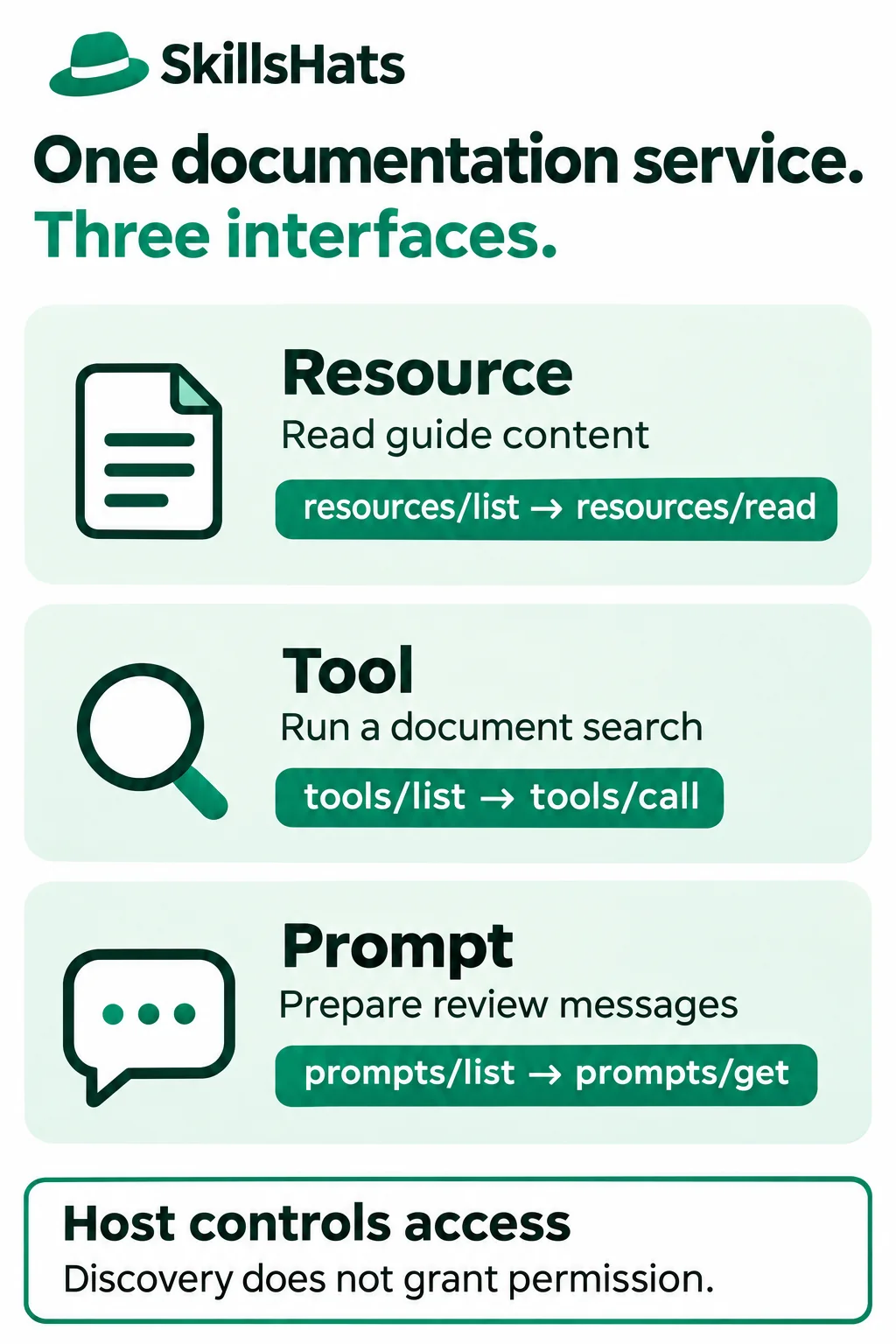
The panels show separate choices, not a required execution order. Discovering a prompt does not make a search run, and reading a resource does not start a review.
Choose by the job each interface does
The official specifications describe resources as application-driven and tools as model-controlled. Prompts are designed for explicit user selection. These describe intended interaction patterns; they are not access-control rules or guarantees about every host’s interface.
| Primitive and purpose | Documentation example | Discovery and use |
|---|---|---|
| Resource: content identified by a URI. | Read the selected release guide. | resources/list → resources/read |
| Tool: an operation with defined inputs. | Search permitted document titles. | tools/list → tools/call |
| Prompt: reusable messages with arguments. | Prepare a clarity-review request. | prompts/list → prompts/get |
A URI identifies a resource; it does not have to be a public web URL. Our docs://guides/release URI is understood by this server. It is not an address to paste into a browser.
Tools have input schemas, which describe accepted fields and values. Prompt arguments are named string values used to customize messages. A resource read returns content, while getting a prompt returns messages the host can present or include in a conversation. None of these steps, on its own, proves that a model has acted on the result.
Run a small documentation service
Imagine an illustrative internal assistant helping someone review a release guide. The service has one fixed document, DOC-17 revision r4. Search finds its URI, the resource supplies its body, and a prompt prepares a review request with a chosen focus.
The example deliberately uses a tiny fixture rather than authentication, storage or a search index. It does not execute the deployment command mentioned inside the guide.
Use a separate directory and virtual environment. The exact snippets were run with Python 3.12.14, mcp 1.26.0, Pydantic 2.14.3 and pydantic-settings 2.16.2:
python3.12 -m venv .venv
. .venv/bin/activate
python -m pip install "mcp==1.26.0" "pydantic==2.14.3" "pydantic-settings==2.16.2"
This is a pinned example using the official Python SDK v1.26.0, not a claim that these are the latest versions. It negotiates protocol 2025-11-25. Current documentation also covers newer revisions and SDKs; check your host’s supported version before adapting the code. Keep tutorial dependencies separate from an existing site’s runtime.
Save this as docs_server.py:
from mcp.server.fastmcp import FastMCP
from mcp.types import ToolAnnotations

mcp = FastMCP("Documentation fixture")
URI = "docs://guides/release"
GUIDE = "DOC-17 r4 | Release guide | Run deploy.sh. Check the dashboard."


@mcp.resource(URI, name="Release guide", mime_type="text/plain")
def release_guide() -> str:
    return GUIDE


@mcp.tool(annotations=ToolAnnotations(readOnlyHint=True))
def search_docs(query: str) -> str:
    """Search the title of the one-document synthetic catalog."""
    if not query.strip():
        raise ValueError("Query must not be empty.")
    if query.casefold() in "release guide":
        return "DOC-17 | " + URI + " | Release guide"
    return "No matching documents."


@mcp.prompt()
def review_guide(focus: str) -> str:
    """Prepare a review request for the guide; do not execute it."""
    if focus not in ("clarity", "completeness"):
        raise ValueError("Choose clarity or completeness.")
    return (
        "Review " + URI + " for " + focus + ". "
        "Quote evidence; do not run commands."
    )


if __name__ == "__main__":
    mcp.run(transport="stdio")
The decorators register three interfaces on one server. The resource returns fixed text. The tool performs a case-insensitive substring search against one title, with an explicit empty-query check. The prompt accepts only two focus values and returns a message template.
The readOnlyHint annotation describes the search tool’s intended behavior. It is not a sandbox or proof that arbitrary server code cannot write data. This particular fixture has no write operation.
Now save inspect_docs.py beside it:
import asyncio
import sys
from pathlib import Path

from mcp import ClientSession, StdioServerParameters
from mcp.client.stdio import stdio_client


async def main():
    config = StdioServerParameters(
        command=sys.executable,
        args=[str(Path(__file__).with_name("docs_server.py"))],
    )
    async with stdio_client(config) as (read, write):
        async with ClientSession(read, write) as session:
            init = await session.initialize()
            print("Protocol:", init.protocolVersion)
            resources = await session.list_resources()
            print("Resources:", str(resources.resources[0].uri))
            data = await session.read_resource("docs://guides/release")
            print("Resource:", data.contents[0].text)

            tools = await session.list_tools()
            print("Tools:", tools.tools[0].name)
            found = await session.call_tool("search_docs", {"query": "release"})
            assert not found.isError
            print("Tool:", found.content[0].text)
            missing = await session.call_tool("search_docs", {"query": "billing"})
            assert not missing.isError
            print("No matches:", missing.content[0].text)
            empty = await session.call_tool("search_docs", {"query": " "})
            print("Empty query rejected:", empty.isError)

            prompts = await session.list_prompts()
            print("Prompts:", prompts.prompts[0].name)
            prompt = await session.get_prompt(
                "review_guide", arguments={"focus": "clarity"}
            )
            print("Prompt:", prompt.messages[0].content.text)


if __name__ == "__main__":
    asyncio.run(main())
Run the client from that directory:
python inspect_docs.py
Expected standard output:
Protocol: 2025-11-25
Resources: docs://guides/release
Resource: DOC-17 r4 | Release guide | Run deploy.sh. Check the dashboard.
Tools: search_docs
Tool: DOC-17 | docs://guides/release | Release guide
No matches: No matching documents.
Empty query rejected: True
Prompts: review_guide
Prompt: Review docs://guides/release for clarity. Quote evidence; do not run commands.
SDK request logs appear on standard error. This dependency combination also emits Pydantic settings’ IncompleteFieldDefinitionWarning for the SDK’s lifespan field; the example completes with exit status 0.
The SDK handles the example’s initialization and stdio messages. Stdio carries protocol messages through a subprocess’s standard input and output. The script chooses the calls deterministically, reads the results and exits. It does not connect to a desktop AI host or send anything to a model.
Notice what discovery does and does not do
For each interface, listing describes what is available; using it is a separate request. The client deliberately makes both requests so you can see that distinction.
Resource: load the guide as context
list_resources() returns the guide’s URI and metadata. read_resource() retrieves its text. The host must still decide whether that text belongs in the model’s context. A resource can contain private data, so listing or knowing its URI does not remove the need for authorization.
For larger catalogs, a resource template can describe parameterized URIs rather than listing every document. Resources can also be exposed as links returned by tools. This example uses one listed resource to keep discovery visible.
Misuse: treating a resource read as a deployment command. “Run deploy.sh” is document content to inspect; reading it must not be interpreted as permission to execute it. If an integration needs an action, give it an explicit operation with appropriate checks.
Tool: perform the search
list_tools() describes search_docs and its query input. call_tool() runs that operation and returns its result. A tool can perform a read-only computation or query; tools are not limited to writes.
Here, billing produces a successful “No matching documents” result. A blank query produces a tool error. Real clients need to distinguish unsuccessful execution from a successful search with no matches. Protocol and connection failures can also raise SDK exceptions instead of producing a tool result.
Misuse: hiding a write inside a tool presented as a search. A call named search_docs should not silently publish a guide or post a comment. Match the operation’s actual effects to its description, permission scope and confirmation policy.
Prompt: prepare messages for a review
list_prompts() describes review_guide and its required focus argument. get_prompt() fills the template and returns a user message. It does not invoke the search tool, fetch the guide, call a model or perform a review.
The returned message names a URI, but naming it does not automatically attach its contents. A host must arrange for the selected guide text and messages to reach the model if the user chooses to continue. A review could then identify missing working-directory or success-check information; that outcome is illustrative, not a model result measured here.
The current official SDK prompt guide also describes user selection and message rendering. Its newer SDK examples use different imports; the runnable code above follows the pinned v1 API.
Misuse: treating a retrieved prompt as an authorization grant. A template that says “deploy now” does not authorize a release. The host must preserve user intent and enforce tool permissions independently of prompt text.
Check the host, not just the server
Advertising all three capabilities does not prove that a chosen host gives users a resource picker, exposes prompt selection, or handles every content type. Some integrations focus on tool calls; others provide resource attachments or prompt menus. Inspect current support for the specific host/version instead of assuming that every MCP connection offers the same UI.
Test the whole interaction you need: can the host discover the item, retrieve its content, show where it came from, and use it in the intended conversation? Also check permissions, argument entry and failure messages. A prompt might appear as a menu item rather than a slash command; the protocol does not require that one UI pattern.
For a documentation assistant, separate the checks:
- If a resource is unavailable or forbidden, explain the missing evidence rather than inventing the guide.
- If search returns nothing, report the empty result; do not quietly broaden access to private documents.
- If prompt arguments are invalid, ask for a supported focus rather than treating the text as an executable instruction.
- If the document changes, identify which revision informed the answer and fetch current content when needed.
This fixture is local and unauthenticated, with public synthetic content only. Production access control, identity, output limits, request deadlines and audit records remain application/server work. Treat document text, tool descriptions and retrieved prompts as untrusted input.
Keep the useful interfaces and their costs
A resource gives a guide a stable identity that a host can read or attach as context. That helps when users select known documents, but large catalogs still need a discovery strategy and a policy for stale or private content.
A search tool accepts a query and computes a result set. That helps when the relevant document is unknown, but you must maintain validation, ranking, limits and failure handling. This one-title substring search is a teaching fixture, not a useful production search engine.
A prompt shares a task’s wording and arguments across users. That helps standardize a review request, but it adds template maintenance and depends on host support. Getting the template does not guarantee a good model response.
You can combine these in a fixed workflow or an agent-directed interaction; see AI Agents vs Chatbots vs Workflows for that separate choice. A direct API or a pasted document may be simpler when only one application needs a known operation.
Start by naming the content, operation and reusable request your integration needs. Expose each through the matching primitive, then verify discovery and actual use in the intended host. Keep access checks separate, and add only the interfaces whose value justifies maintaining them.
Topics: Model Context Protocol, MCP resources, MCP tools, MCP prompts, documentation services, host integration, Python.