Cache Hits and Misses Explained
A cache hit means the requested data is available in the cache. A cache miss means it is not available, so the application must fetch it from another source. In a cache-aside design, that source is usually a database. A hit avoids that database read, but it does not prove the cached value is current.
This guide is for developers deciding whether caching will help a read-heavy application. We will follow a product description through its first read, repeated reads, expiration and an update.
Follow a product request
Imagine an online store where many visitors open the same product page. This is an illustrative scenario, not a production benchmark. Product descriptions change infrequently, and the business accepts a short delay before edits appear. Checkout prices and inventory require separate freshness decisions.
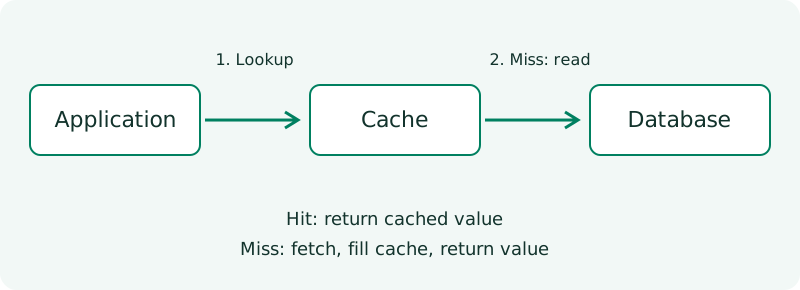
The application looks for a key such as product:42:description. On a miss, it reads the description from the database, caches it and returns it. The next request can reuse that cached copy. The application owns this loading logic, which is why the pattern is called cache-aside. Microsoft’s cache-aside documentation describes this request flow.
| Request state | Result | Database read? |
|---|---|---|
| First request, empty cache | Miss; load and store the description | Yes |
| Repeated request before expiration | Hit; return the stored description | No |
| Request at or after expiration | Miss; reload the description | Yes |
| Description updated without invalidation | Possible hit with an old description | No |
Expiration and eviction are different. Expiration makes an entry unusable after its time-to-live (TTL). Eviction removes an entry, for example to make room when storage is limited. Either can cause a later miss.
Run a small Python example
Save the following as cache_demo.py and run python cache_demo.py. It uses Python 3.8 or later and no external packages. Dictionaries stand in for the database and cache; an explicit clock makes expiration reproducible without sleeping. This is a single-process teaching simulation, not a distributed cache implementation.
database = {42: "Blue mug"}
cache = {}
database_reads = 0
TTL = 5


def get_description(product_id, now):
    global database_reads
    entry = cache.get(product_id)
    if entry is not None:
        value, expires_at = entry
        if now < expires_at:
            return "HIT", value
        del cache[product_id]

    database_reads += 1
    if product_id not in database:
        return "MISS", None

    value = database[product_id]
    cache[product_id] = (value, now + TTL)
    return "MISS", value


def update_description(product_id, value):
    database[product_id] = value
    cache.pop(product_id, None)


print(get_description(42, now=0))
print(get_description(42, now=1))
print(get_description(42, now=5))
update_description(42, "Green mug")
print(get_description(42, now=6))
print(get_description(99, now=7))
print("Database reads:", database_reads)
Expected output:
('MISS', 'Blue mug')
('HIT', 'Blue mug')
('MISS', 'Blue mug')
('MISS', 'Green mug')
('MISS', None)
Database reads: 4
At time 5, the first entry has expired because the comparison is strictly now < expires_at. The update removes the cached copy after changing the source, so time 6 reloads the new description. Product 99 does not exist; this example returns None without caching the absence. Repeating that missing lookup therefore reads the source again.
Try changing the description directly in database between the first two requests. The second request will still return the cached text. That is the difference between successfully finding a value and finding a fresh value.
What a hit ratio tells you
The cache hit ratio is hits / total lookups. In the five lookups above it is 1 / 5, or 20%. This deliberately short trace includes expiration and an update, so it is not a prediction of a real store’s workload.
For an illustrative serial request model, suppose cache lookup takes 2 milliseconds and a database read takes 20 milliseconds. Ignoring cache writes and all other work, a 90% hit ratio gives an average lookup time of 2 + (0.10 × 20) = 4 milliseconds. At a 0% hit ratio it becomes 22 milliseconds: checking the cache adds overhead when nothing is reused. These are assumed timings, not measured results.
Measure hit ratio alongside end-to-end latency, source read volume, cache errors and whether returned data meets your freshness requirements. An aggregate ratio can also conceal misses on your most expensive queries.
Where caching helps—and where it does not
| Use case | Potential advantage | Cost or limitation |
|---|---|---|
| Popular product descriptions | Repeated reads avoid source work | Edits require expiration or invalidation |
| Expensive report with an accepted refresh interval | Many readers reuse one computed result | Readers may see the previous report |
| Mostly unique search requests | Little reuse to exploit | Cache lookup and storage may add overhead |
| Checkout inventory decision | A cached display can support browsing | A cached value alone cannot authorize a stock reservation |
Before adding a cache, check whether an index or a smaller query solves the expensive read. Those changes may remove enough work without creating another copy to maintain. A local in-memory cache avoids a network hop but is private to each worker; a shared cache allows workers to reuse entries and introduces a service dependency.
Handle the cases the demo leaves out
TTL selection depends on how much staleness the product can accept and how frequently readers revisit a key. There is no universal correct duration. Cache-aside does not itself guarantee consistency, as the pattern’s consistency guidance explains.
In a real service, several requests may miss the same key at once. They can all load the source, creating a burst often called a cache stampede. Request coalescing can let one loader do the work while others wait, but needs bounded waits and failure handling.
A cache timeout also differs from an ordinary miss. Falling back to the database may preserve service, but an outage can redirect substantial traffic there. Use timeouts and capacity-aware limits; decide explicitly whether to serve an allowed stale value or return an error when the source cannot cope.
Finally, the update function above is sequential. Concurrent readers and writers can race and repopulate an old value even around invalidation. Treat consistency as a separate design requirement. Include tenant and other response-changing inputs in cache keys so one request cannot receive another request’s data.
Conclusion
Use caching when requests reuse expensive data and you can define acceptable freshness. Start with one read path, choose its key and invalidation behavior, then compare latency and source load before and after the change. Skip caching when reuse is low or the added consistency work outweighs the benefit.
To reinforce the request flow, explore the interactive Visualize catalog. Then modify the demo to repeat the missing-product lookup and observe why a miss is not necessarily an error.
Topics: caching, cache-aside, system design, Python, cache invalidation